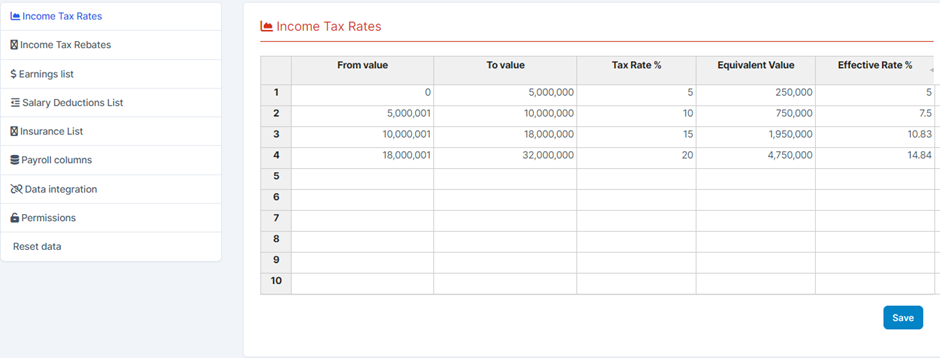
Income Tax Rates screen is used to enter and manage employee’s personal income tax
Select the HR Payroll Module -> Select Income Tax Rates -> Enter the values for the fields -> Click Save to save the data you just manipulated. The data input in this screen will be used for the Income taxes screen which is used to calculate the employee’s personal income tax
* Note: The formula will be calculated as follows:
For example, the corresponding columns From value, To value, Tax Rate, Equivalent Value and Effective Rate are abcde, then we have:
o (ba)*%c+d1 outputs the field value d2
o (d*100) / b outputs the field value e
o For example, if we have an income of 7,890,000, the tax is calculated as follows: the first 5 million will be calculated as 5% = 5,000,000 * 5% = 250,000 and the remaining amount will be calculated on the second line as 2,890,000 *10% = 289,000. So the total amount to pay tax is 250,000 + 289,000 = 539,000 VND
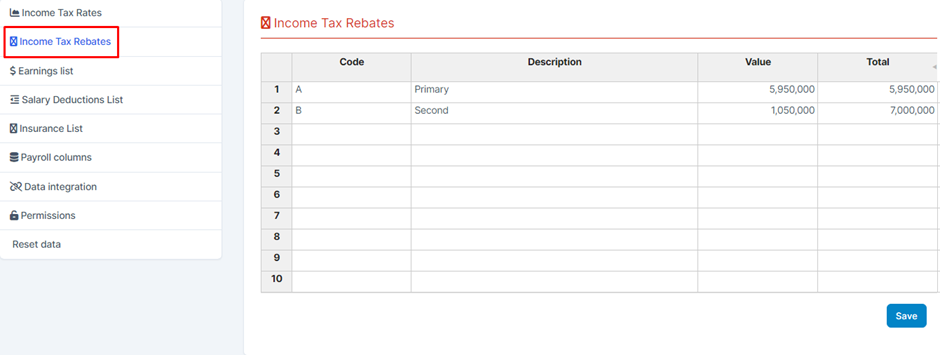
Income Tax Rebates in HR Payroll
The Income Tax Rebates screen is used to declare the corresponding personal income tax refund. Values must be entered fixed from low to high, for example internship salary, basic salary, probationary salary, official salary… * Note : Line Total 2 = Total 1 + Value 2
Select the HR Payroll Module -> Select Income Tax Rebates -> Enter the values for the fields -> Click Save to save the data you just manipulated. The input data of this screen will be used for the Employees menu screen
*Explanation: The code field is used to enter the code of the tax refund. When an employee is allowed to refund tax, at the Employee screen -> Income rebate code field, enter the tax refund code, then the employee will be refunded the correct value of the Total field corresponding to the tax refund code entered
Shopping Basket
We use cookies on our website to give you the most relevant experience by remembering your preferences and repeat visits. By clicking “Accept”, you consent to the use of ALL the cookies. However you may visit Cookie Settings to provide a controlled consent.
This website uses cookies to improve your experience while you navigate through the website. Out of these cookies, the cookies that are categorized as necessary are stored on your browser as they are essential for the working of basic functionalities of the website. We also use third-party cookies that help us analyze and understand how you use this website. These cookies will be stored in your browser only with your consent. You also have the option to opt-out of these cookies. But opting out of some of these cookies may have an effect on your browsing experience.